A panel that shows every working Telegram account at once
When there are many working accounts, each one lives in a separate app window with a login of its own. We built a web panel: all the accounts in one list with the state of each, actions that start on a whole group at once, and long work that runs in the background on the server. The panel can be opened right now: at the link it runs on made-up accounts.
Build a control panel
for many Telegram accounts.
Each account is a separate app window. To find out whether it still works, you have to open it by hand. To do the same on twenty accounts, you repeat that twenty times.
What was needed was one panel in the browser: a list of accounts with their state, actions on a whole group at once, and a server that carries the long work with no person taking part.
Six solutions
the panel rests on.
We gathered the accounts into one list
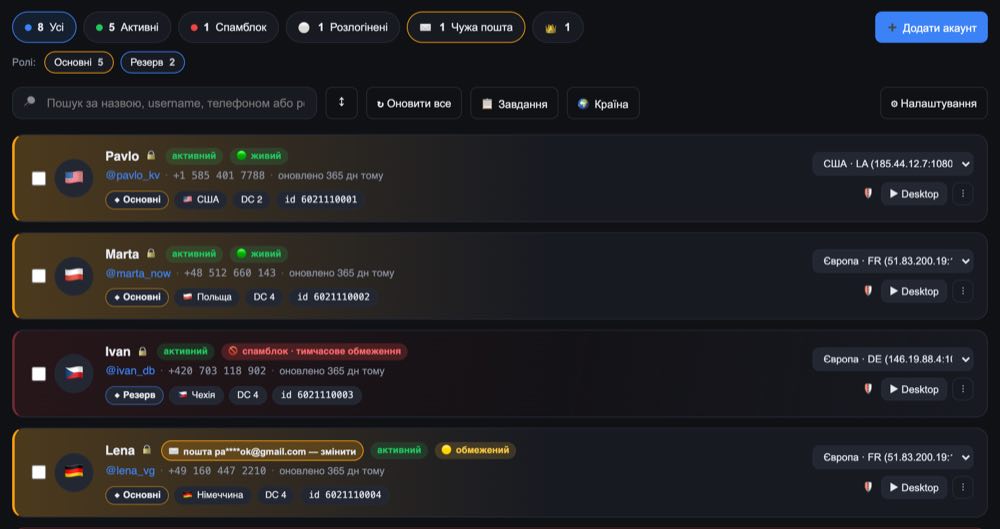
The name, the @handle, the number, the country, the data center, the proxy assigned for getting online and the state: alive, restricted, logged out. Counters for each state at the top. To understand what is going on across the whole setup you no longer have to open the accounts one by one.
An account is added without SMS
Just move over the folder with the app's data, or a ready login file, and the account appears in the panel. The name, the number and the rest of the data are read by themselves: no logging in again, no waiting for a code.
Long work runs in the background
Every action becomes a task of its own with progress for each account. A task can be stopped altogether or taken off just one account. If the server was restarted, the tasks carry on by themselves from where they were.
Proxies under watch
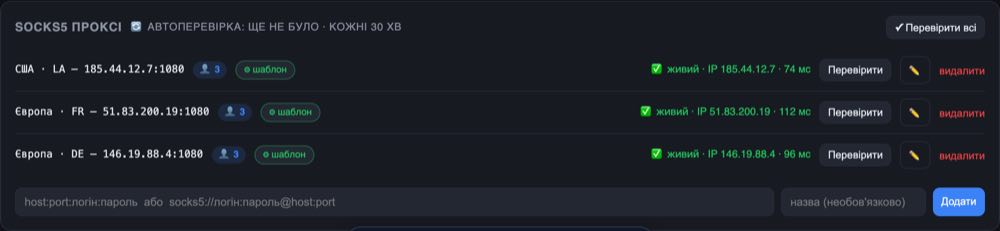
Each account is assigned a proxy of its own to get online through. The panel checks them itself every half hour, shows the response time and how many accounts sit on each one, and when one goes down it sends a Telegram message about it.
Several people on one panel
Each one sees only their own accounts, their own tasks and their own proxies. What belongs to somebody else is neither shown nor changed — the separation is made at the level of the data, not by hiding buttons.
Backups and a trash bin
The whole panel packs into an encrypted backup under a passphrase, and comes back up from it. A deleted account first goes to the trash bin, from where it can still be brought back.
One hundred fifty-four actions,
gathered into seventeen sections.
The main ones are below. Each line is a group of actions rather than a single button, and they work both on one account and on several dozen at once.
Working with accounts
The panel itself
The list of accounts, the actions
and the proxies.
The list of accounts
Counters at the top: how many are active, how many have restrictions, how many are logged out. In the row — the country, the data center, the proxy and the state. The role is marked by the color of the card, so the group you need is visible without reading the labels.
Actions on an account
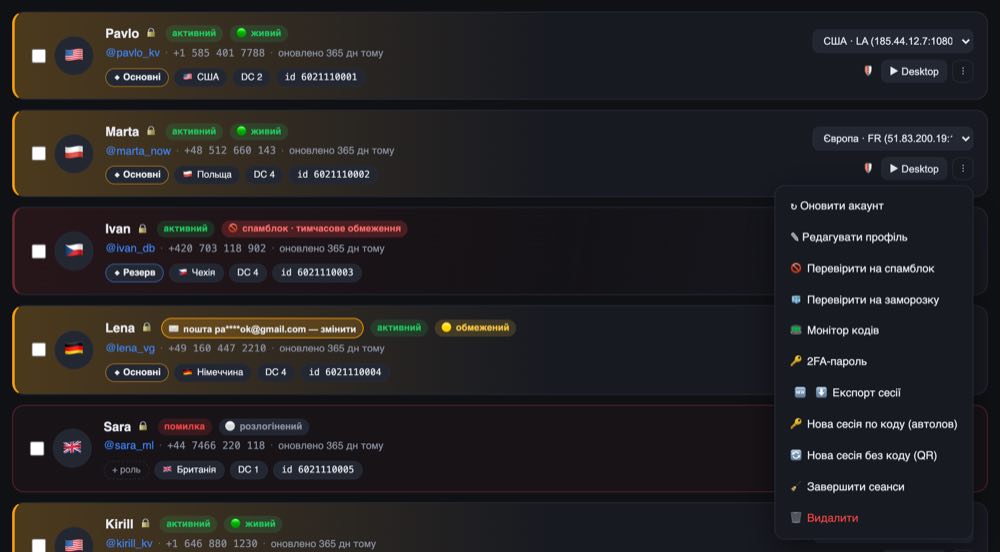
Refresh the state, check the restrictions, fix the profile, reissue the login, terminate the other sessions, export the account. All of it from the same list, with no going to separate pages.
Proxies
A list with the response time, the external address and the number of accounts on each one. The check runs itself every half hour, and it can be started by hand with one press.
A panel has to keep the work going
and not go down with the server.
Long work has to live through a restart
The server will reboot, the power will blink, an update will come out. If a task that runs for hours starts from the beginning after that, people simply stop using the panel. So the state of the tasks goes onto the disk, and after a start they carry on by themselves.
Separation is made in the data, not in the interface
Hiding somebody else's button is easy, but that is not protection. From the very start, a panel for several people was written so that another person's record is not handed out, even if the request is made directly.
We have to be able to show the work
That is why the panel has a separate mode on made-up accounts: the same screens, the same actions, but not a single real account. There is something to show the client, and nobody's data is out in the open while you do it.
The same works for more than accounts
Any routine that is now done by hand one at a time — orders, exports, reports, sending out documents — folds into a panel where it happens as a list and by itself. Tell us what you have to repeat every day and we will show you what it would look like.